Several keywords in CygNet Software are encrypted to provide added security for usernames and passwords.
Keywords are encrypted with a single, common, encryption key file, which stores an AES key used to encrypt and decrypt usernames and passwords. The file should only be read by the user running the related service and any user that needs to run the Config File Manager, which can be used to change (re-encrypt) any related keyword. The Config File Manager also can be used to create a new encryption key file after upgrading, or if one did not previously exist.
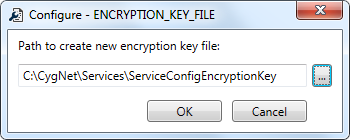
The name and location of the common encryption key file is specified by the ENCRYPTION_KEY_FILE keyword, which is found in the configuration files (.cfg) for the services that have encrypted keywords (Acs.cfg, Fms.cfg, and Gns.cfg). The default name of the file is ServiceConfigEncryptionKey and its default location is the root of the Services data directory.
NTFS permissions should be used to prevent unauthorized users from accessing the encryption key file. It should not be copied to a BSS.
The encryption key file is not replicated, so if configuration files are manually "replicated," the encryption key file should also be.
The following keywords are encrypted in the common encryption key file.
| Service | Encrypted Keywords | Notes |
|---|---|---|
|
ACS |
||
|
FMS |
||
|
GNS |
These keywords can be changed (and re-encrypted) using either the Config File Manager (and as described below) or the GNS Configuration Utility. The password for the email server keyword (EMAIL_PASSWORD) cannot be decrypted, as it is only ever compared against. |
|
|
RSM |
Not encrypted, but obfuscated using a password hashing algorithm. See the note under PIN_WORK_FACTOR for more information about password hashing. The password for this keyword cannot be decrypted, as it is only ever compared against. See RSM Password for more information about this keyword. |
Use the Config File Manager to create or update the encryption key file for all encrypted keywords.
Note: This feature is only available for local configuration files. If you have loaded remote configuration files, you will be warned of this.

|
|
|

